Software Engineering
Libraries vs Frameworks: Understanding Inversion of Control the Right Way
Library vs Framework — one gives you tools to call when you need them, the other provides the structure that calls your code.When you have been programming for some time, you must have come across these two buzzwords:
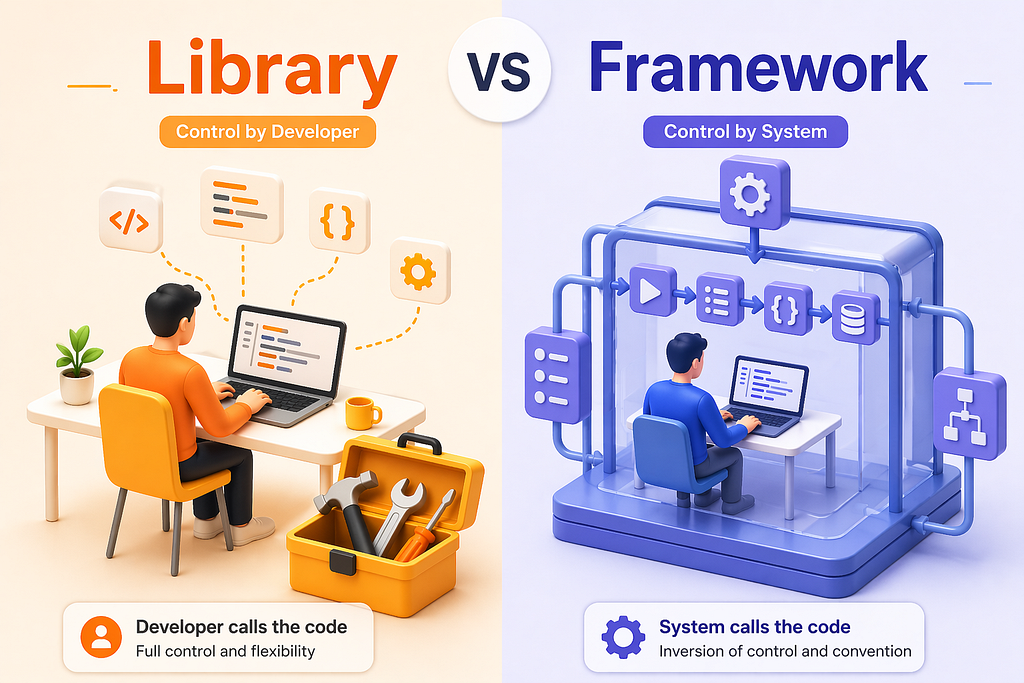
Library vs Framework — one gives you tools to call when you need them, the other provides the structure that calls your code.
When you have been programming for some time, you must have come across these two buzzwords: library and framework.
These aren’t the same thing.
The confusion between these two concepts could be undermining your ability to learn new tech and even affect the architecture of your applications.
At first sight, libraries and frameworks seem to be similar. They’re only reusable codes, after all. But what you don’t realize is the basic difference that gives power to one party over another.
And when you do realize this, you will see it everywhere.
In this piece, I’ll try to explain the difference in layman’s terms, starting with analogies, defining them technically, and finally giving practical examples.
Library (layman)
A library is like a toolbox or a set of specialized tools you can pick up when needed. As a developer, you are in control and you call the library functions when you need them. For example, if you need to calculate a square root, you might import a math library and call sqrt() yourself. In layman’s terms, using a library is like choosing the right tool for a specific task (e.g. using a hammer to drive a nail).
Library (technical)
Technically, a library is a collection of pre-written code (functions, classes, modules) that your application code can invoke for specific functionality. Libraries typically focus on a narrow scope (such as date formatting, math operations, or UI widgets). You include a library in your project and explicitly call its functions.
For example, jQuery is a JavaScript library for DOM manipulation, and React is a JavaScript library for building UIs. In both cases, your code drives when and how the library is used.
Framework (layman)
A framework is like a pre-built house blueprint or skeleton that defines the structure of your application. It provides a template or outline you must follow, and it calls your code at the appropriate times. In lay terms, using a framework is like designing furniture for a fixed set of rooms in a house plan: you fill in the details, but the overall layout and rules come from the framework.
Framework (technical)
Technically, a framework defines the architecture and flow of an application. It “inverts control” compared to a library: the framework itself calls your code when needed. GeeksforGeeks explains, “It is our code which calls the library code while in framework, it is framework’s code which calls our code”. In other words, with a framework you write certain callback functions or classes, but the framework orchestrates when and where your code runs.
Examples of frameworks include Angular (a JavaScript web framework), Django (a Python web framework), and Spring (a Java framework). These frameworks provide a wide-ranging environment and require you to follow their conventions. For instance, Angular enforces a component-based structure, and Django provides URL routing and model layers that you must use (you fill in the details of views and templates).
Inversion of Control
The central technical distinction is often described by “inversion of control” (IoC). When using a library, your code is in charge and it calls the library as needed. When using a framework, the framework is in charge and it calls your code. One summary puts it clearly: Your code controls the library. The framework controls your code.
Key Differences
Below is a summary table highlighting the main differences between libraries and frameworks:
Simple Examples
Library example: In Python, you might use the built-in math library and call its functions yourself. For example:
import math
print(math.sqrt(16)) # We (the programmer) call math.sqrt from the math library
Here the program explicitly invokes the library function sqrt(). The library does not dictate how or when you call it – you are in control.
Framework example:
In contrast, consider a simple web server using the Flask framework (Python). You define handler functions, and the framework calls them when HTTP requests arrive:
from flask import Flask
app = Flask(__name__)
@app.route(’/‘)
def hello():
return “Hello, World!”
In this Flask app, we decorate a function with @app.route. Flask (the framework) then calls our hello() function when a web request comes in. We don’t write the code that listens for requests – Flask does that and invokes our handler. Express (a Node.js framework) works similarly.
In summary, using a library means you pick the tools and call them as needed. Using a framework means you plug your code into the framework’s predefined structure and let it drive the application flow.
Typical Use Cases
Libraries:
Use libraries when you need to add specific functionality to your code without imposing structure. For example, you might use a library for data analysis (NumPy, Pandas), for making HTTP requests (requests in Python, Axios in JavaScript), for UI components (React, jQuery), or for charts/plots (Chart.js, Matplotlib). These libraries help with particular tasks. Because you call them explicitly, libraries are ideal for utilities and helper functions. Their use is modular: you can include many different libraries together.
Frameworks:
Use a framework when you are building an entire application and want a structured environment. For instance, if you’re developing a full web application, you might choose a web framework (Angular, React as a library/framework, Django, Ruby on Rails, or Express) that provides routing, data models, and templates. For mobile apps, frameworks like React Native or Flutter give you a project skeleton and libraries for UI components.
In machine learning or AI, frameworks like TensorFlow or PyTorch provide a pipeline and structure for defining and training models. Frameworks come with conventions and patterns (often called “opinionated” structures) that guide the entire development process.
Examples of Libraries and Frameworks by Domain
Web Development
Popular libraries include React (a JS UI library), jQuery (JS DOM library), Lodash (JS utility library), and D3.js (JS visualization library).
Popular frameworks include Angular (a JS single-page app framework), Vue.js (frontend framework), Express.js (Node.js backend framework), Django (Python web framework), Ruby on Rails (Ruby web framework), and Spring (Java web framework).
Each framework provides structure for building web apps, whereas each library offers specific features you can incorporate.
Artificial Intelligence (AI)
In AI development, frameworks often refer to full ML/deep-learning platforms. For example, TensorFlow and PyTorch are widely used AI/ML frameworks. They supply tools for building and training neural networks.
Meanwhile, libraries in AI include Keras (a high-level neural network API), Caffe (for deep learning), and various specialized libraries (like OpenCV for computer vision).
Additionally, libraries like Scikit-Learn provide a broad set of machine-learning algorithms. A recent survey notes Popular AI frameworks such as TensorFlow and PyTorch are used for developing machine learning models, and other useful AI libraries include Scikit-Learn, Keras, and Caffe.
Machine Learning (ML)
Machine learning overlaps with AI. Common ML frameworks are again TensorFlow and PyTorch (for deep learning).
Common ML libraries include Scikit-Learn (for classical ML algorithms), XGBoost or LightGBM (for boosted trees), and libraries like Pandas (data handling). For example, Scikit-Learn is a Python library for machine learning used for tasks like classification and clustering. In practice, data scientists often use libraries like Scikit-Learn for algorithmic components while using frameworks (TensorFlow/PyTorch) for building neural-network models.
Each of the examples above reflects real-world tools: React, jQuery, Angular, Django, TensorFlow, PyTorch, etc, illustrating how frameworks and libraries appear across different fields. The key is: libraries offer reusable chunks of code you call directly, and frameworks give you a structure in which your code operates.
Sources: Trusted documentation and articles explain that libraries and frameworks differ mainly by “who calls whom” and by their scope (specific helpers vs full application environments). The examples given (React, Angular, TensorFlow, etc.) come from official docs and educational resources, ensuring accuracy.